Billing Plans
Create billing plans that set what your merchants pay per payment method and terminal type, clone a plan to change its pricing, see which merchants are on it, and assign plans during onboarding.
Overview
A billing plan sets what your merchants pay for each payment method: a percentage, a fixed fee and a minimum fee per transaction, optionally different for in-store, online and SoftPOS payments. You create plans once and assign them to merchants when you onboard them.
You’ll find it under Configuration → Billing Plans in the sidebar. Billing plans are available depending on your partner agreement; if the menu item is missing, your merchants’ pricing is managed by Surfboard.
The Plan List
The list shows every plan you have, with the number of payment methods in it, the terminal types it covers (for example In-store or SoftPOS) and the methods by name. Use Search by Plan ID… to find one.
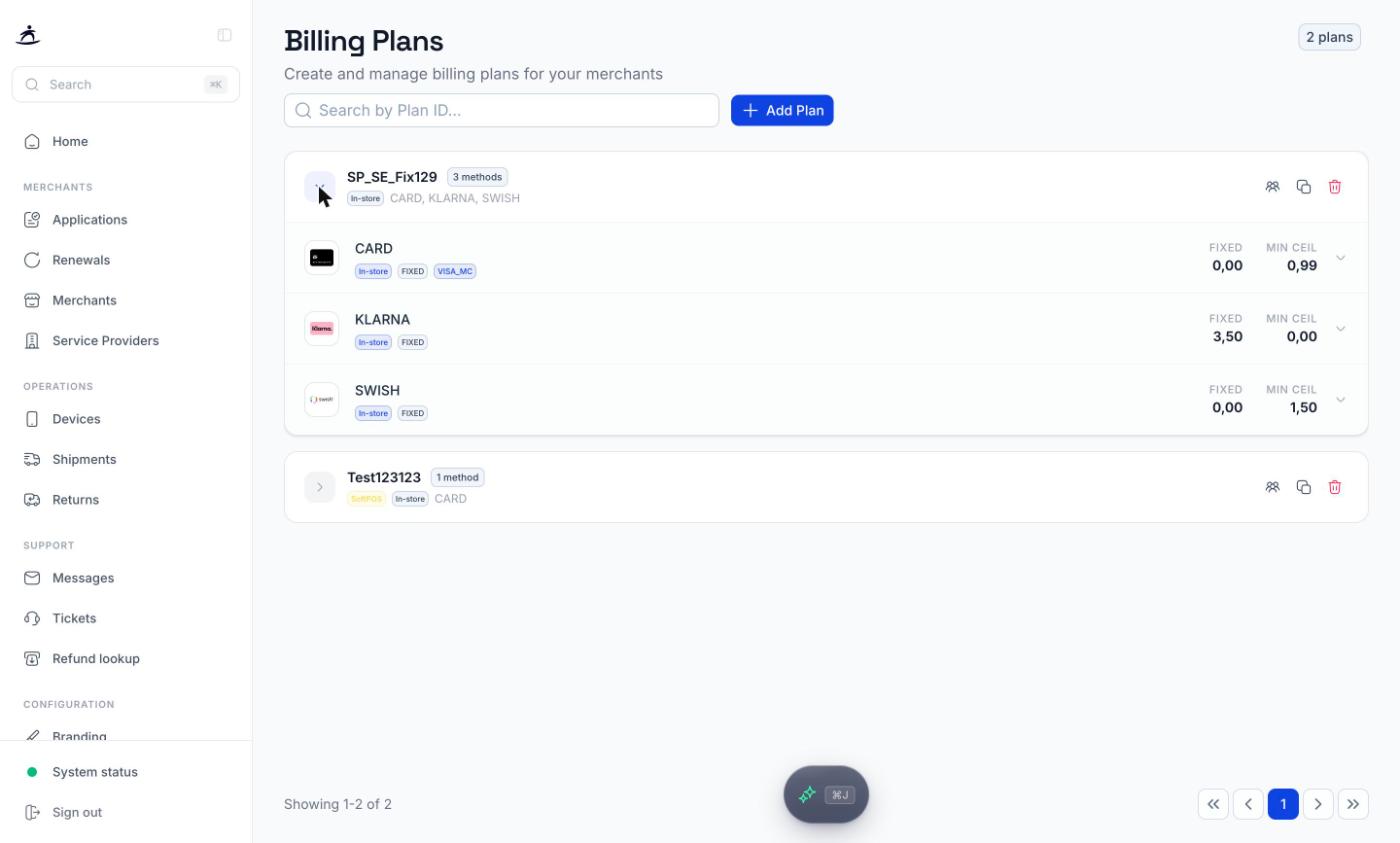
Click the arrow on a plan to expand it. Each payment method shows its terminal type, plan type, card brand where relevant, and its fees (FIXED and MIN CEIL). Expand a method for its full fee structure by region (domestic, EEA, international) and card type.
Three icons sit on the right of each plan:
| Icon | What it does |
|---|---|
| View assigned merchants | Lists the merchants currently on the plan, each linking to the merchant |
| Clone plan | Opens a new plan with all settings copied, see Changing a plan’s pricing |
| Delete | Deletes the plan after a confirmation. A plan cannot be deleted while merchants are on it |
Note: Deleting is permanent and removes all the plan’s payment method configurations. A plan can’t be deleted while merchants are on it, so check View assigned merchants first.
Creating a Plan
Click Add Plan.
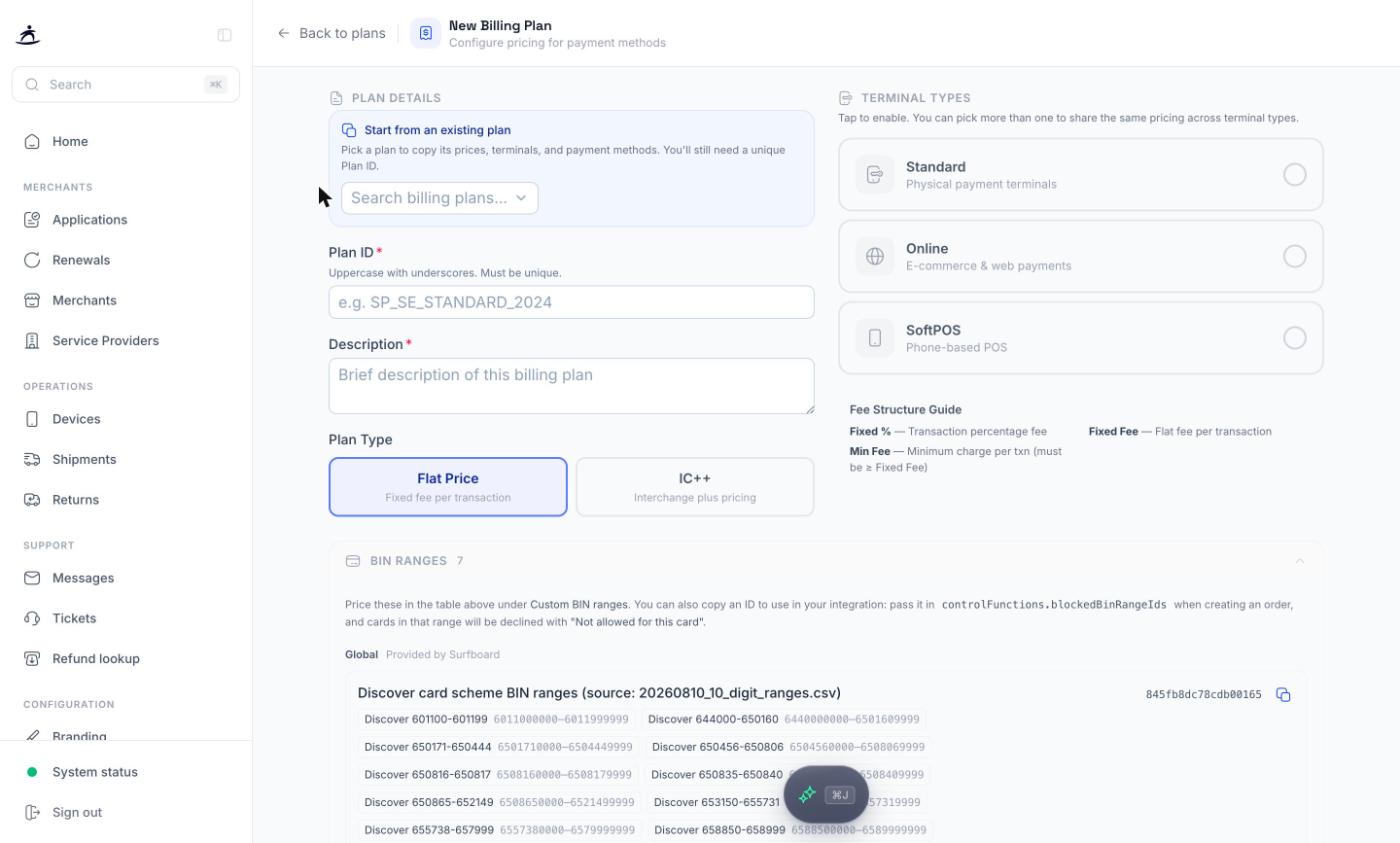
1. Plan details
- Start from an existing plan (optional) — pick a plan to copy its prices, terminal types and payment methods as a starting point.
- Plan ID — uppercase with underscores, for example
SP_SE_STANDARD_2024. It must be unique and cannot be changed later. - Description — what the plan is for.
- Plan Type:
- Flat Price — a fixed price per transaction.
- IC++ — interchange plus pricing.
2. Terminal types
Choose which kinds of payments the plan covers. You can pick more than one:
| Terminal type | Covers |
|---|---|
| Standard | Physical payment terminals |
| Online | E-commerce and web payments |
| SoftPOS | Phone-based POS |
3. Pricing
Under Apply fees to terminal types, tick the terminal types the fees you enter should be written to. Tick several to give them identical pricing in one go; tick one to price it on its own. To give Online a different price from Standard, fill in Standard first, then select only Online and enter its prices.
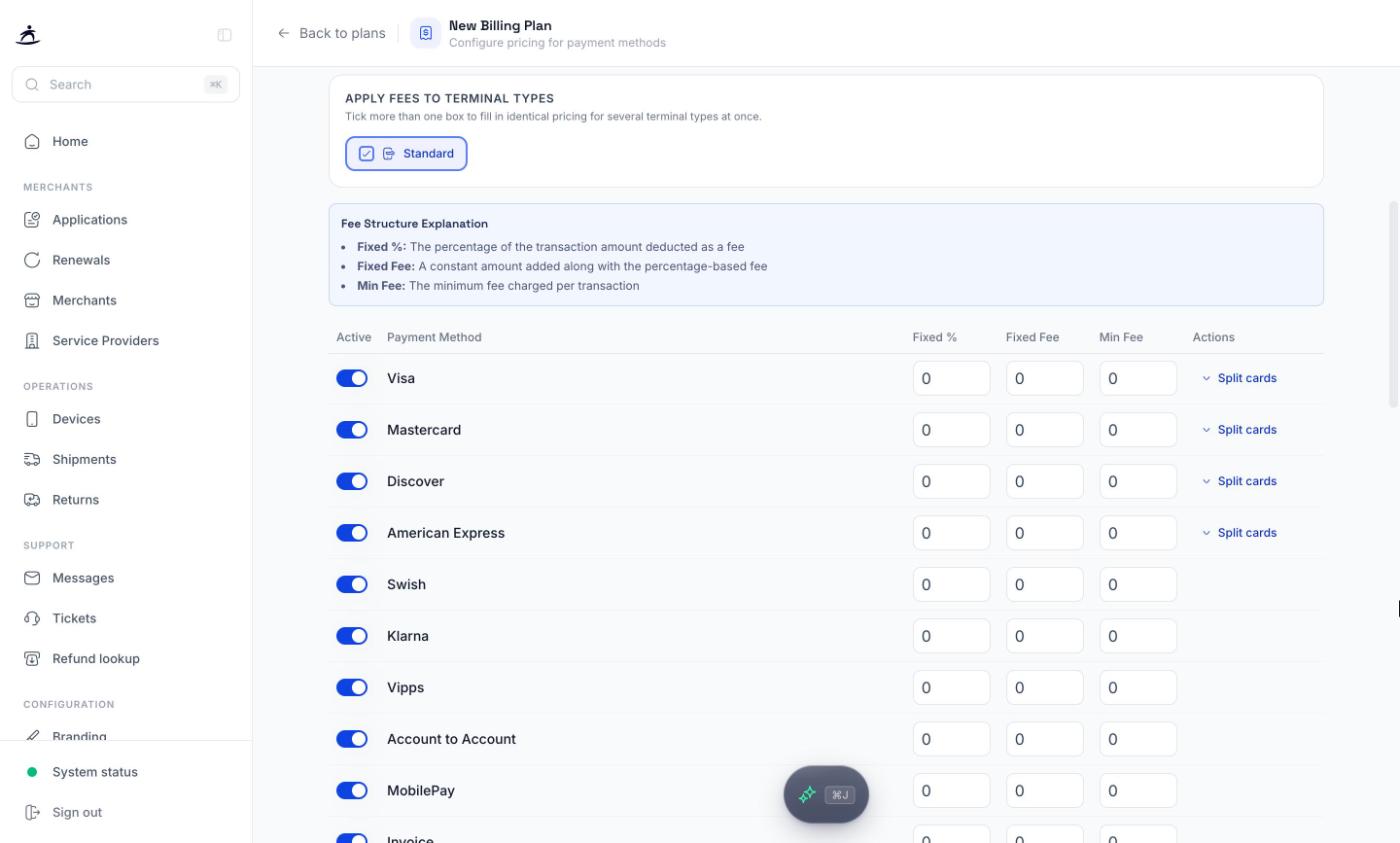
The table lists the payment methods you can price: Visa, Mastercard, Discover, American Express, Swish, Klarna, Vipps, Account to Account, MobilePay, Invoice and Svea. Switch off the methods the plan shouldn’t include, and for each one you keep, enter:
| Fee | Meaning |
|---|---|
| Fixed % | Percentage of the transaction amount |
| Fixed Fee | Flat amount added per transaction |
| Min Fee | The least a transaction is charged. Must be greater than the Fixed Fee |
For card brands, Split cards breaks the price down into 12 card types: domestic, EEA and international, each as debit or credit, consumer or commercial. Use it when, for example, commercial cards should cost more than consumer cards.
Custom BIN ranges let you price a specific range of card numbers. A BIN range price takes precedence over the card brand row for cards that fall inside the range. The available ranges are listed under BIN ranges further down the form and on the Developers page.
4. Save
Click Create Plan. The portal checks that:
- the Plan ID is unique,
- at least one terminal type is selected,
- at least one payment method has pricing,
- every minimum fee is greater than its fixed fee, and every split card type has a value.
Only methods with fees entered are saved in the plan.
Changing a Plan’s Pricing
Plans cannot be edited once created. To change pricing, clone the plan:
- Click Clone plan on the plan in the list.
- All settings are copied over and the Plan ID is suggested as the old ID with
_COPYadded. Pick the ID you want. - Adjust the prices and click Create Plan.
The original plan stays as it was, with its merchants. New merchants can then be onboarded on the new plan.
Assigning Plans to Merchants
You choose the billing plan when you create the merchant’s application, in the Billing Plan field on the Business step. If you have exactly one plan, it is used by default. If you don’t have the plan you need yet, Create a billing plan takes you to the plan form and back to your application afterwards, with the new plan selected. See Applications & Merchant Onboarding.
The merchant’s Billing tab shows the active plan and its fees. It is read-only: the plan is the one chosen when the merchant’s application was created.
Adding a payment method to a merchant’s plan
When you activate a payment method for a merchant and the plan has no price for it, the Payment Methods tab offers Set up billing plan. The price you enter there is added to the plan itself, so it applies to every merchant on that plan. See Payment Methods.
Best Practices
- Name plans so you can find them — include country and tier in the Plan ID, for example
SP_SE_STANDARD_2024. - Clone instead of starting over — a cloned plan keeps every price, so you only change what differs.
- Check assigned merchants before deleting — use View assigned merchants first.
Related
- Payment Methods — activating methods and adding them to a plan
- Applications & Merchant Onboarding — choosing the plan for a new merchant
- Developers — BIN range IDs