Offers Where the Customer Already Is
Promotions on the terminal's idle screen and on the receipt, with a QR code to the offer behind them. Scheduled per store, measured by scans, and created by the merchant in the Merchant Portal or by your system through the API.
Every Payment Is a Moment of Attention
The customer is looking at the terminal before they pay and at the receipt after. Promotions put the merchant's offer in both places, without a separate screen, app or marketing tool.
A promotion is either a link the customer opens with the QR code, or a promo code that discounts the order. Both run on a schedule, in the stores you assign them to, and stop on their own when they end.
Measured, not guessed
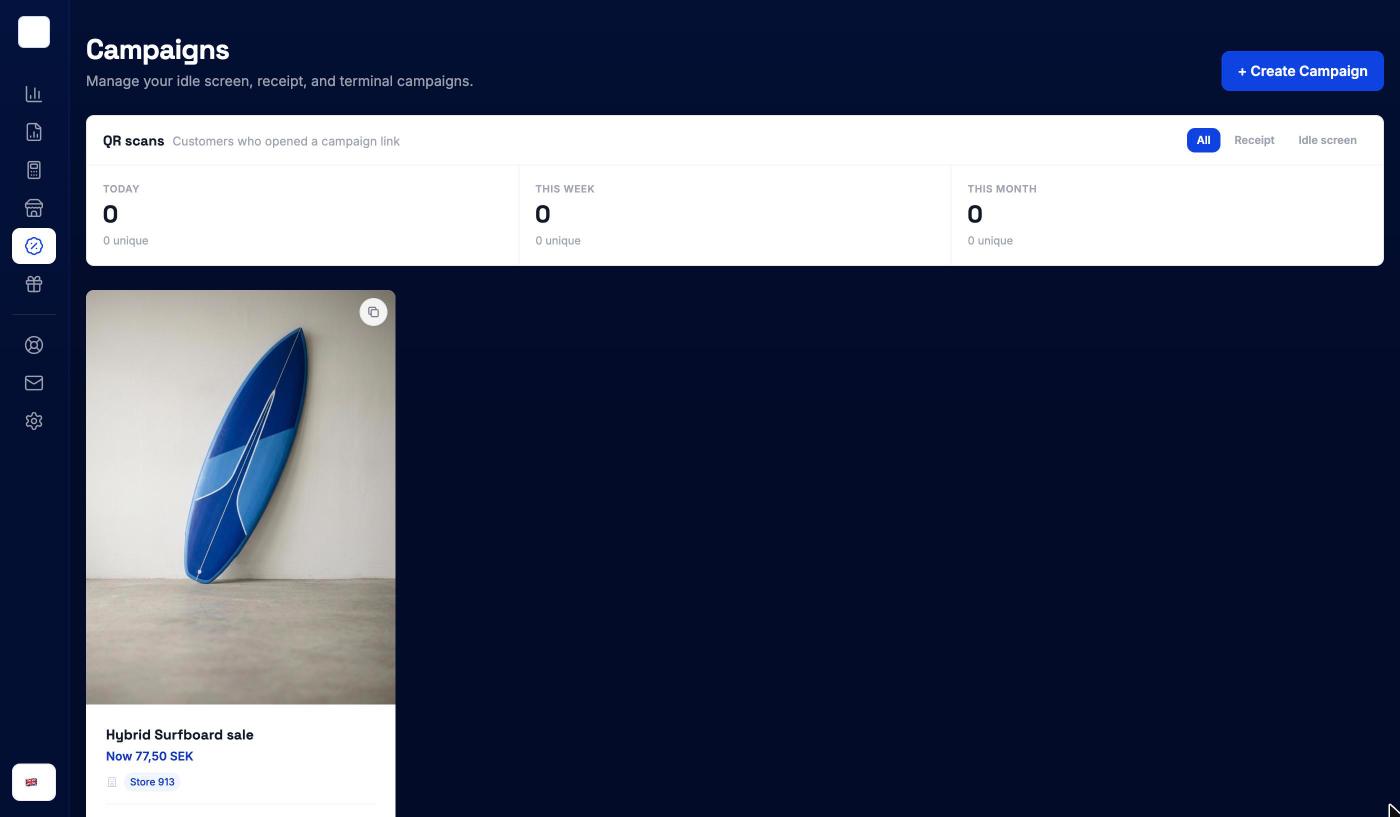
QR scans are counted per promotion and per store, today, this week and this month, with unique scans alongside. Filter by idle screen or receipt to see where customers actually react.
How Promotions Work
Create the promotion
POST /merchants/:merchantId/promotions/v2
{
  "name": "Autumn coffee",
  "promoType": "REDIRECT_LINK",
  "schedule": {
    "startTime": "2026-11-01T00:00:00Z",
    "endTime": "2026-11-30T23:59:59Z"
  },
  "visualAssets": [
    { "type": "TEXT", "headline": "Beans of the month" },
    { "type": "IMAGE", "url": "https://example.com/beans.jpg" }
  ],
  "redirectLink": { "url": "https://example.com/beans" }
}Assign it to stores
Follow what it does
What merchants run
From a product of the month to a membership drive.
1. The Idle Screen Earns Its Place
A terminal spends most of the day waiting for the next payment. A promotion uses that screen for the product of the month, a membership offer or an event, with a QR code to the page behind it.
2. On the Receipt Too
The same promotion follows the customer home on the digital receipt. Scans from the receipt and from the idle screen are counted separately, so the merchant sees which one works.
3. Promo Codes With Limits
A promo code takes a percentage or a fixed amount off the order. Set the rules once:
- A minimum order amount, or specific products or categories in the basket
- A total budget for the discount given away
- A cap on redemptions in total and per customer
4. Scheduled Per Store
Run a promotion in one store, a region or the whole chain, for a weekend or a season. It starts and stops on schedule, with nobody touching the terminals.
5. Written With AI
In the Merchant Portal, the merchant describes the campaign in a sentence and picks the products. A draft is filled in for them to check, with a live preview of the terminal screen.
6. Campaign Prices on Products
A product can also carry a temporary price or percentage discount of its own. It applies wherever the product is sold, including on payment links.
Run by the merchant, in the Merchant Portal
Merchants create campaigns themselves, by hand or with AI, schedule them and assign them to stores. Each campaign has its own scan statistics, and a deactivated campaign can be duplicated to run again.
Partners can create and manage the same promotions for their merchants from the Partner Portal or the API.
Create a promo code promotion
Five endpoints cover the lifecycle: create, update, fetch, list and delete. A new promotion goes live once it is assigned to stores and synced to their terminals.
POST /merchants/:merchantId/promotions/v2
  {
    "name": "Members save more",
    "promoType": "PROMO_CODE",
    "schedule": {
      "startTime": "2026-11-01T00:00:00Z",
      "endTime": "2026-11-30T23:59:59Z"
    },
    "visualAssets": [
      { "type": "TEXT", "headline": "Members save more", "subheadline": "All of November" }
    ],
    "promoCode": {
      "code": "NOV10",
      "offer": { "type": "PERCENTAGE_OFF", "percentage": 10 },
      "budget": { "maxAmount": 500000 }
    },
    "redemptionRules": { "minimumOrderAmount": 25000 },
    "usageLimits": {
      "maximumRedemptions": 1000,
      "maximumRedemptionsPerCustomer": 1
    }
}Build it yourself
Step-by-step developer guides for everything on this page.
Issue and manage gift cards, track transactions, and create marketing promotions using the Surfboard Payments APIs.
Read guide Online · GuideCreate and manage product catalogs, products, variants, inventory levels, and analytics through the Catalog API.
Read guide Online · GuideLearn how to create orders with line items, tax, customer details, and control functions. The starting point for accepting payments with the Surfboard API.
Read guide