A Payment Link for Any Order
Build an order, get a link to a hosted payment page in your merchant's brand, and send it wherever the customer is. No terminal, no webshop, no card details over the phone. Managed in the Merchant Portal or created from your own system through the same API.
The Same Order, Paid Somewhere Else
A payment link is an ordinary order created against a payment page terminal. Line items, VAT, customer details and references work exactly as they do in store. The difference is that the customer pays on their own phone or computer, whenever it suits them.
Every payment method the merchant has switched on is available on the page, and the payment lands in the same sales list, settlement report and webhook stream as everything else.
Followed to the end
Each link shows its status, how long it has left, and every payment attempt with its result and method. Extend the end date when a customer needs more time, or cancel a link sent by mistake and it stops working at once.
How Payment Links Work
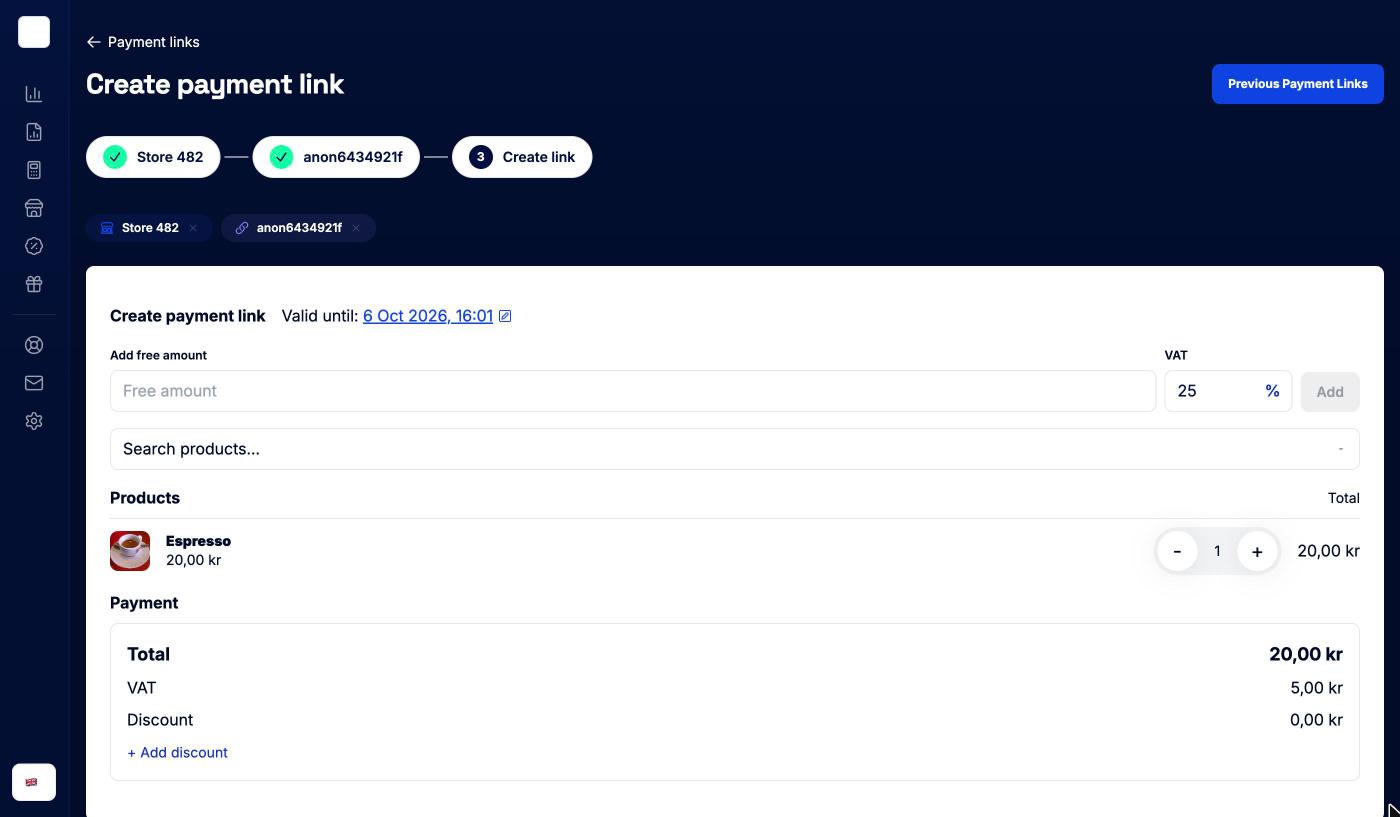
Build the order
Choose how the link behaves
"controlFunctions": {
  "online": {
    "paymentPageValidFor": "3d",
    "enforce3DSecure": true,
    "enforceTokenization": true,
    "generateShortLink": true,
    "payButtonType": "BOOK"
  },
  "delayCapture": true,
  "lockToPaymentMethods": ["CARD", "SWISH"]
}Share it anywhere
Where payment links fit
Anywhere the customer is not standing in front of a terminal.
1. Deposits and Bookings
A hotel, salon or rental business takes a deposit when the booking is made, not when the customer walks in.
- Delayed capture reserves the amount and captures it later
- A short validity window so stale links cannot be paid
- Button text set to Book, Pay or Order
2. Orders Taken by Phone or Chat
The customer calls, messages or emails. Staff build the order from the catalogue and send a link back in the same conversation.
No card numbers read out over the phone and no webshop needed.
3. Invoices With a Pay Button
Print the QR code or the short link on an invoice, a quote or a reminder. The customer pays with card, wallet or a local method instead of a bank transfer.
4. Subscriptions That Start From a Link
The first payment is made on the link, where the card is tokenized and 3-D Secure is completed. Renewals are then charged from the backend against the stored token, at the frequency and amount set on the order.
5. Finishing a Payment Somewhere Else
A payment that could not be finished on the terminal can be completed on a payment page instead. Same order, same reference, one record of what happened.
6. Built Into Your Own System
Everything the Merchant Portal does with payment links is the same Orders API underneath. Create links from your POS, booking system or CRM and get the result back by webhook.
Run by the merchant, in the Merchant Portal
Merchants create links per store, from the catalogue or a free amount, and share them with a QR code, a copy button or a direct email. The list filters by pending, completed, failed and cancelled, and each row expands to the items, the customer and the attempts.
No integration needed to get started. Partners who want links inside their own product use the API instead.
Create a payment link
Create the order against the store's payment page terminal and the response carries the link, plus a short link for text messages when you ask for one. Confirm the payment by webhook rather than by the redirect.
POST /orders
  {
    "terminal$id": "813ca2cb12ce400405",
    "referenceId": "booking-2207",
    "orderLines": [
      {
        "id": "DEPOSIT",
        "name": "Room deposit",
        "quantity": 1,
        "amount": {
          "regular": 50000,
          "total": 50000,
          "currency": "752",
          "tax": [{ "amount": 5357, "percentage": 12, "type": "VAT" }]
        }
      }
    ],
    "totalOrderAmount": {
      "regular": 50000,
      "total": 50000,
      "currency": "752",
      "tax": [{ "amount": 5357, "percentage": 12, "type": "VAT" }]
    },
    "controlFunctions": {
      "initiatePaymentsOptions": {
        "paymentMethod": "CARD",
        "amount": 50000
      },
      "online": {
        "paymentPageValidFor": "2d",
        "generateShortLink": true,
        "payButtonType": "BOOK"
      }
    }
  }

  // Response
  {
    "status": "SUCCESS",
    "data": {
      "orderId": "8455c12f9fd0620a010b",
      "paymentPageLink": "https://pay.withsurfboard.com/8455c12f9fd0620a010b?pi=...",
      "shortLinkUrl": "https://srfb.se/Iq4JfPgHL"
    }
}Build it yourself
Step-by-step developer guides for everything on this page.
Take online payments on a Surfboard-hosted checkout page. Create an online store, verify its domains, create an order against the PaymentPage terminal it comes with, and redirect the customer or send them the link.
Read guide Online · GuideEmbed a payment form directly in your web app with the Surfboard Online SDK. Full UI control with Surfboard handling PCI compliance.
Read guide Online · GuideActivate, deactivate, and list payment methods for a merchant. Manage card, Swish, Klarna, AMEX, Vipps, MobilePay, and more via the API or Partner Portal.
Read guide