Changing a Merchant's Settlement Schedule
A merchant wants weekly instead of daily payouts. Generate a signing link from the merchant's Configuration tab and the new schedule applies once they sign. Also covers net or gross settlement and the daily cut-off time.
Overview
A merchant’s settlement schedule decides how often their money is paid out, and with it, how often a settlement report is produced. It is set when the merchant is onboarded and can be changed afterwards — but not by you alone. The schedule is part of the merchant agreement, so a change has to be signed by the merchant.
You start the request from the partner portal. The portal generates a signing link. You send that link to the merchant, they sign, and the new schedule takes effect.
The same Settlement page also holds two settings you can change yourself, without a signature: whether fees are deducted daily or monthly, and the daily cut-off time. They are covered further down.
First, Check What They Actually Want
“Can we get weekly reports?” is usually one of two different requests, and only one of them needs a signature:
| What the merchant means | What they need |
|---|---|
| ”Pay us weekly instead of daily” | A settlement schedule change — the flow below |
| ”Send us a weekly summary of what we sold” | Nothing. Reports already cover any period they choose |
Downloadable reports in the merchant’s Reports tab are independent of the settlement schedule. A merchant on daily settlement can still pull a weekly or monthly report whenever they like, and so can you. If all they want is the numbers for a week, point them at Reports and you are done — no signature, no waiting.
Ask which one it is before starting a contract change.
Requesting the Change
- Open the merchant from the Merchants list.
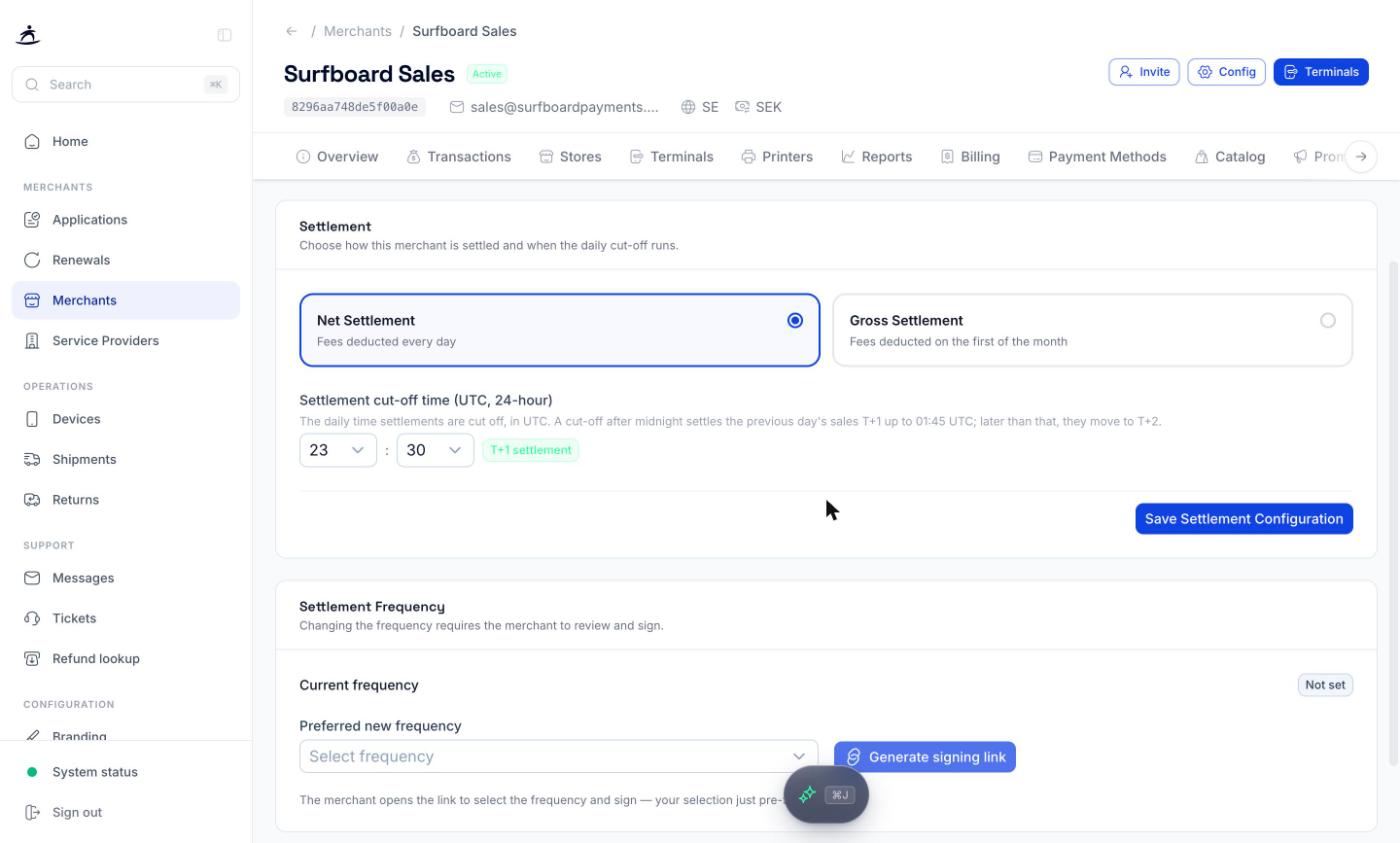
- Go to the Configuration tab and open Settlement.
- Scroll to the Settlement Frequency card. Current frequency shows what the merchant is on today.
- Choose the Preferred new frequency: Daily, Weekly or Monthly.
- Click Generate signing link.
- Copy the Signing link and send it to the merchant. Its status is shown next to it.
The merchant opens the link, chooses the frequency and signs. Your choice only pre-fills their form. Until they sign, the merchant stays on their current schedule — the request on its own changes nothing.
You cannot sign on the merchant’s behalf. Settlement terms sit in the merchant agreement, which is why the signature is required rather than a formality. If the merchant does not sign, the request does not take effect.
Available Schedules
| Schedule | Payout runs |
|---|---|
DAILY | Every banking day |
WEEKLY | Once per week |
MONTHLY | Once per month |
These are the same values used by settlementFrequency when a merchant is created over the API — see the Merchants API for the onboarding side of this.
What Changes, and What Does Not
Changes with the schedule:
- How often a payout reaches the merchant’s bank account
- How often a settlement report is generated
Does not change:
- The transactions themselves, or their fees
- Access to daily, monthly, or cash-register reports in the Reports tab
- Anything already settled under the old schedule
A longer settlement period means fewer, larger payouts. Merchants sometimes ask for this to cut down on bank reconciliation work, then find it harder to match a payout back to a day’s trading. Reading a settlement report is worth sending along with the change, because the arithmetic they are used to will shift.
After the Change
The first payout on the new schedule covers the transactions that had not yet settled when the change took effect, so it can be an unusual size. That is expected, and it settles into the normal rhythm from the following period.
If a merchant asks why the first weekly payout does not match a week of trading, the offset explained in When a merchant says the totals do not match is the same effect.
Net or Gross Settlement
At the top of the Settlement page you choose how fees are taken:
| Option | How fees are deducted |
|---|---|
| Net Settlement | Fees are deducted every day, from each payout |
| Gross Settlement | The merchant is paid the full amount, and fees are deducted on the first of the month |
Settlement Cut-off Time
Settlement cut-off time (UTC, 24-hour) is the time each day when the day’s sales are closed off for settlement. Pick the hour and minute; the default is 23:30. The time is in UTC, not local time.
A tag next to the time shows what it means for payout timing:
- T+1 settlement — sales are settled the next banking day. A cut-off just after midnight still counts as T+1, up to 01:45 UTC.
- T+2 settlement — a cut-off later than 01:45 UTC (up to midday) moves the previous day’s sales to T+2, one day later.
Click Save Settlement Configuration to apply the settlement type and cut-off time. Neither needs a signature from the merchant.
Related
- Transactions & Reporting — reports available per merchant
- Merchant Management — the merchant detail page and its tabs
- Applications & Merchant Onboarding — signing links during onboarding
- Settlements & Reporting — the reports themselves, over the API
- Reports — the merchant-facing view